Does the iPhone 16e Have MagSafe? What Works and What Doesn't
The iPhone 16e charges wirelessly but has no magnets inside it. That one omission changes which accessories work, which hold weakly, and which do nothing at all.
This post contains Amazon affiliate links. As an Amazon Associate we earn from qualifying purchases, at no extra cost to you.
Short answer: no. The iPhone 16e supports wireless charging, but it does not have the ring of magnets that makes MagSafe work. Those are two different things, and conflating them is why people buy a magnetic wallet for a 16e and find it slides straight off the back.
This is specific to the 16e. Apple added a magnet array to the next model, so if you are shopping for an iPhone 17e the answer is the opposite one: see does the iPhone 17e have MagSafe.
This catches people out because the listings do not help. An accessory described as "compatible with iPhone 16 series" usually means it fits the body, not that it will stick to it.
What MagSafe actually is
MagSafe is two things stacked on top of each other.
The first is wireless charging, which every recent iPhone has. It works by induction between a coil in the charger and a coil in the phone, and it does not need magnets at all. Set the phone down roughly in the right place on a pad and it charges.
The second is the magnet array: a ring of magnets around the charging coil plus a separate alignment magnet that tells an accessory which way is up. That ring is what snaps a wallet on, what holds a charger in exactly the right spot, and what keeps a car mount gripping over a bump.
The 16e has the first and not the second. It charges wirelessly at the standard Qi rate rather than MagSafe's faster aligned rate, and nothing magnetic will attach to it on its own.
What this means accessory by accessory
Wireless charging pads work. Put the phone on a flat pad and it charges, just more slowly than a MagSafe iPhone would and only if you place it accurately. Cheap pads with a small coil are fussier about placement than large ones.
Magnetic chargers do not attach. A puck-style charger will not stay on the back of a bare 16e, and because it cannot self-align, it often will not charge either even if you hold it there.
MagSafe wallets do not hold. This is the most common disappointment, and it is total: without magnets in the phone there is nothing for the wallet to grab. See our MagSafe wallet guide for how much holding force even a good wallet loses through a plain case, which explains why the gap matters so much.
Magnetic car mounts do not hold either. A vent mount that relies on magnets is useless on a bare 16e. Our car charger guide covers what to look for once you have solved the magnet problem.
Magnetic grips slide off. A magnetic grip needs the same ring every other accessory needs.
Clamp mounts, adhesive grips and wired charging all work exactly as they would on any phone, because none of them care about magnets.
The fix costs less than the accessory
You give the 16e a magnet ring by putting one on it, and there are two ways to do that.
The better way is a case with a moulded magnet array. The magnets sit inside the case, positioned correctly relative to the charging coil, and the whole thing behaves close to a real MagSafe iPhone. Attachment is strong, alignment is automatic, and there is nothing to peel off. Look for wording like "built-in magnet ring" or "MagSafe magnets" rather than the vaguer "MagSafe compatible", which sometimes only means there is a hole in the right place.
We now have a guide dedicated to exactly that: best iPhone 16e cases with built-in MagSafe magnets, which also explains why the review counts on those listings are far larger than the phone's age would allow. Our iPhone 16 family case guide flags which picks include a real array, and it covers the 16e specifically because well-made cases for that model are thinner on the ground than for the rest of the line.
The cheaper way is a stick-on magnet ring, sold for a few dollars, applied to the back of the phone or the inside of a case.
Our guide to magnet rings covers which ones hold, why case material decides whether the adhesive survives, and when a ring costs you wireless charging. It restores attachment for wallets and mounts at lower strength than a moulded array. It is visible through a clear case, and if you stick it to the phone itself rather than the case you have to position it carefully, because a ring that sits off-centre will fight the charging coil rather than help it.
One thing to avoid: do not stack a stick-on ring on the outside of a case and then put a magnetic charger on top of it. Every extra millimetre between coils costs charging efficiency and generates heat instead.
Is the 16e worth it anyway
For most people the missing magnets are an annoyance with a five dollar fix, not a reason to buy a different phone. What matters is knowing about it before you spend money on accessories that assume magnets.
If you already own magnetic accessories from a previous iPhone, budget for a magnet-ring case as part of the switch. If you are starting fresh, buy the case first and the accessories second, because the case determines whether any of them will work.
Frequently asked questions
Does the iPhone 16e support wireless charging? Yes. It charges on any standard Qi wireless pad. What it lacks is the magnet ring, so it will not snap onto magnetic chargers and it charges more slowly than a MagSafe iPhone.
Why does my MagSafe wallet fall off my iPhone 16e? Because there is nothing in the phone for it to hold onto. The 16e has no magnet array. A case with a built-in magnet ring, or a stick-on ring, solves it.
Can I add MagSafe to the iPhone 16e? Not the real thing, but close. A case with a moulded magnet array gives you strong, correctly aligned attachment. A stick-on magnet ring is the cheaper and weaker option.
Will a MagSafe charger work on the 16e? It will not attach magnetically, and because magnetic chargers rely on that alignment, charging is unreliable even when held in place. A flat Qi pad is the better choice on a bare 16e.
Do iPhone 16 cases fit the iPhone 16e? No. The 16e has a different camera layout and no Camera Control button, so it needs a case made for it specifically. Check the listing names the 16e, not just the 16 series.
Does a magnet case slow down charging on the 16e? A well-made case with a correctly positioned ring does not. Problems come from thick cases, stacked stick-on rings, or magnets placed off-centre, all of which increase the gap between coils.
More reviews
Will iPhone 17 Cases Fit the iPhone 18 Pro?
They are within two hundredths of an inch of each other in height and width, which is exactly why people try it. Here is what Apple's own numbers say and what goes wrong.
Read the review→Does the iPhone 17e Have MagSafe? Yes, Unlike the 16e
Apple quietly fixed the biggest accessory complaint about its budget iPhone. The 17e has a real magnet array, which changes what you need to buy alongside it.
Read the review→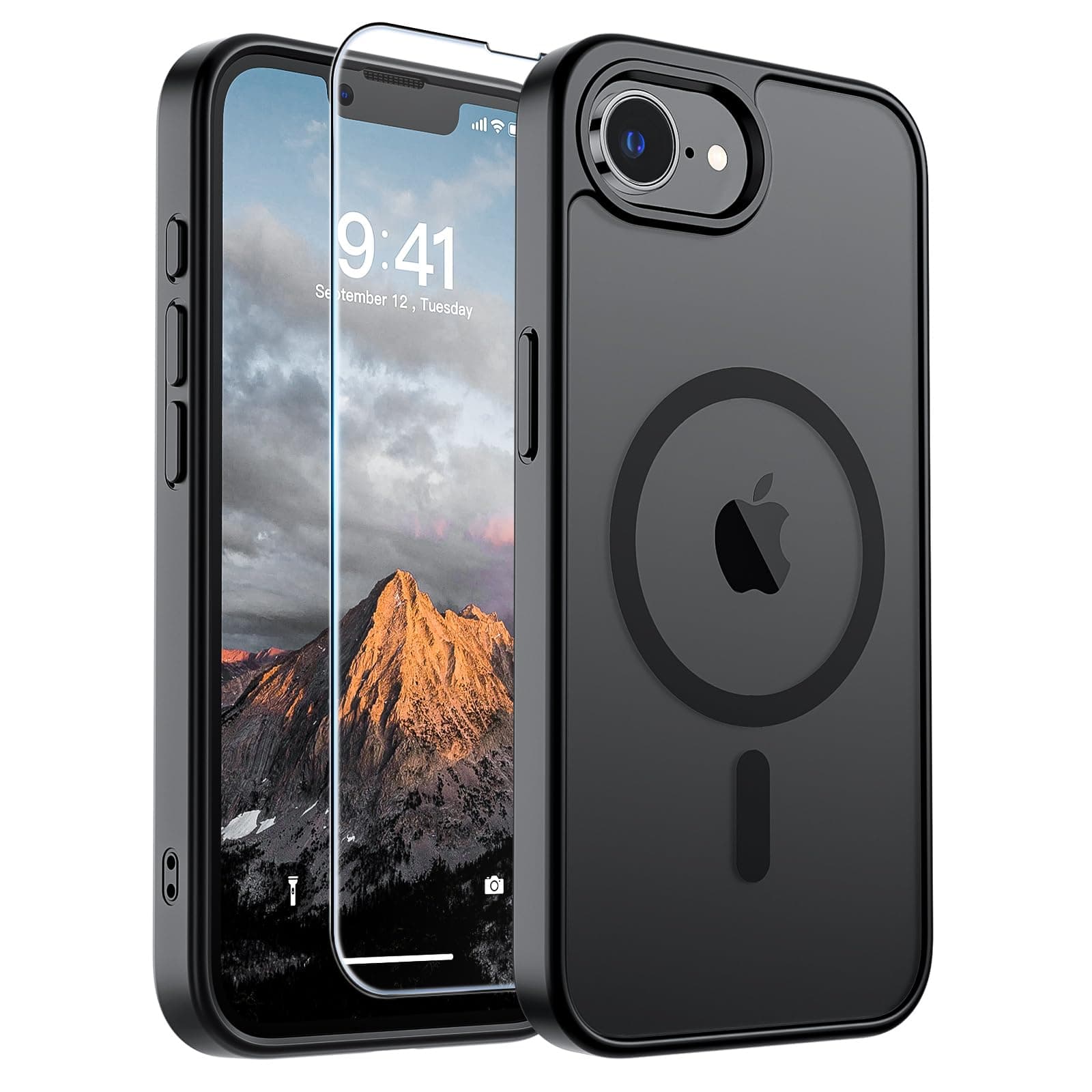 Review
Best iPhone 16e Cases With Built-In MagSafe Magnets
The 16e has no magnets of its own, so the case decides whether wallets, mounts and magnetic chargers work at all. Four picks that carry a real magnet array, from under $7 to just over $30.
Read the review→